Configuration
Learn more about i18n configuration.
Goal: Add Italian support in 4 steps (~15 minutes).
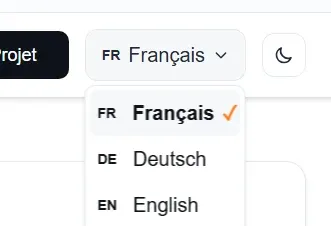
Both themes ship French, German and English out of the box. This guide adds a fourth language — Italian — and the same steps work for any other language.
Update src/i18n/ui.ts
Add the language to the languages object:
export const languages = { fr: { name: 'Français', flag: '🇫🇷' }, de: { name: 'Deutsch', flag: '🇩🇪' }, en: { name: 'English', flag: '🇬🇧' }, it: { name: 'Italiano', flag: '🇮🇹' },} as const;Add all translations to the ui object:
export const ui = { fr: { /* French translations */ }, de: { /* German translations */ }, en: { /* English translations */ }, it: { 'nav.home': 'Home', 'nav.work': 'I nostri lavori', 'nav.about': 'Informazioni', 'nav.contact': 'Contattaci', 'business.name': 'La tua azienda', 'business.tagline': 'Il tagline della tua azienda', 'site.title': 'Titolo del tuo sito', 'site.description': 'Descrizione del tuo sito per SEO', 'author.name': 'Tu Numero', 'author.email': 'tu@email.com', 'theme.toggle': 'Cambia argomento', // ... copy all other keys from FR, DE or EN },} as const;Update astro.config.mjs
Add the locale to the Astro configuration:
i18n: { defaultLocale: "fr", locales: ["fr", "de", "en", "it"], routing: { prefixDefaultLocale: false, },},Create Page Folder
Create src/pages/it/index.astro:
---import BaseLayout from "../../layouts/BaseLayout.astro";import Header from "../../components/Header.astro";import Landing from "../../components/Landing.astro";---
<BaseLayout>  <Header />  <Landing /></BaseLayout>
Test
Start your dev server and visit:
http://localhost:4321/it/✅ Success indicators:
/it/lang="it" attributeThe BaseLayout.astro checks if the current locale exists in the languages object:
const lang: Language = (currentLocale && currentLocale in languages) ? currentLocale as Language : defaultLang;No hardcoded checks! If you add a language to ui.ts, it’s automatically supported.
The default-locale homepage (src/pages/index.astro) ships a small inline script that redirects first-time visitors based on navigator.language. Its list of valid locales is derived from the languages object, and an explicit choice made in the language selector (stored in localStorage) is never overridden:
var stored = localStorage.getItem("lang");var lang = stored || (navigator.language || "").split("-")[0].toLowerCase();if (lang && lang !== defaultLang && locales.indexOf(lang) !== -1) { location.replace("/" + lang + "/");}Fully scalable - Any language you add will be auto-detected from the browser, on any static host.
The LanguageSelector.astro imports from ui.ts:
import { languages } from "@/i18n/ui";It automatically displays all available languages with their flags.
The easiest way is to:
ui.tsMake sure to include all these keys (copy from existing languages):
nav.*business.*portfolio.*owner.*contact.*site.*author.*Some values like author.email and author.phone should be the same across all languages (unless you have different contact info per region).
src/├── i18n/│ ├── ui.ts ← Add language here (Step 1)│ └── utils.ts ← No changes needed (dynamic)├── layouts/│ └── BaseLayout.astro ← No changes needed (dynamic)├── pages/│ ├── index.astro ← French (default) + first-visit detection script (dynamic)│ ├── de/│ │ └── index.astro│ ├── en/│ │ └── index.astro│ └── it/ ← Create this (Step 3)│ └── index.astro└── astro.config.mjs ← Add locale (Step 2)// 1. src/i18n/ui.tsexport const languages = { fr: { name: 'Français', flag: '🇫🇷' }, de: { name: 'Deutsch', flag: '🇩🇪' }, en: { name: 'English', flag: '🇬🇧' }, es: { name: 'Español', flag: '🇪🇸' },} as const;
export const ui = { fr: { // ... French translations }, de: { // ... German translations }, en: { // ... English translations }, es: { 'nav.home': 'Inicio', 'nav.work': 'Nuestros Trabajos', 'nav.about': 'Acerca de', 'nav.contact': 'Contacto', // ... rest of translations },} as const;// 2. astro.config.mjslocales: ["fr", "de", "en", "es"],3. Create: src/pages/es/index.astro4. Test at: http://localhost:4321/es/Check that it’s added to the languages object in ui.ts with the as const modifier.
Verify all translation keys exist in the ui object for that language.
Detection runs client-side on the first visit and respects a language stored in localStorage (key lang). Clear that key or test in incognito — a previous explicit choice in the language selector is never overridden.
Make sure you have the as const on both the languages and ui objects in ui.ts.
Configuration
Learn more about i18n configuration.
Customization
Customize content and components.
Styling
Style your multilingual site.